

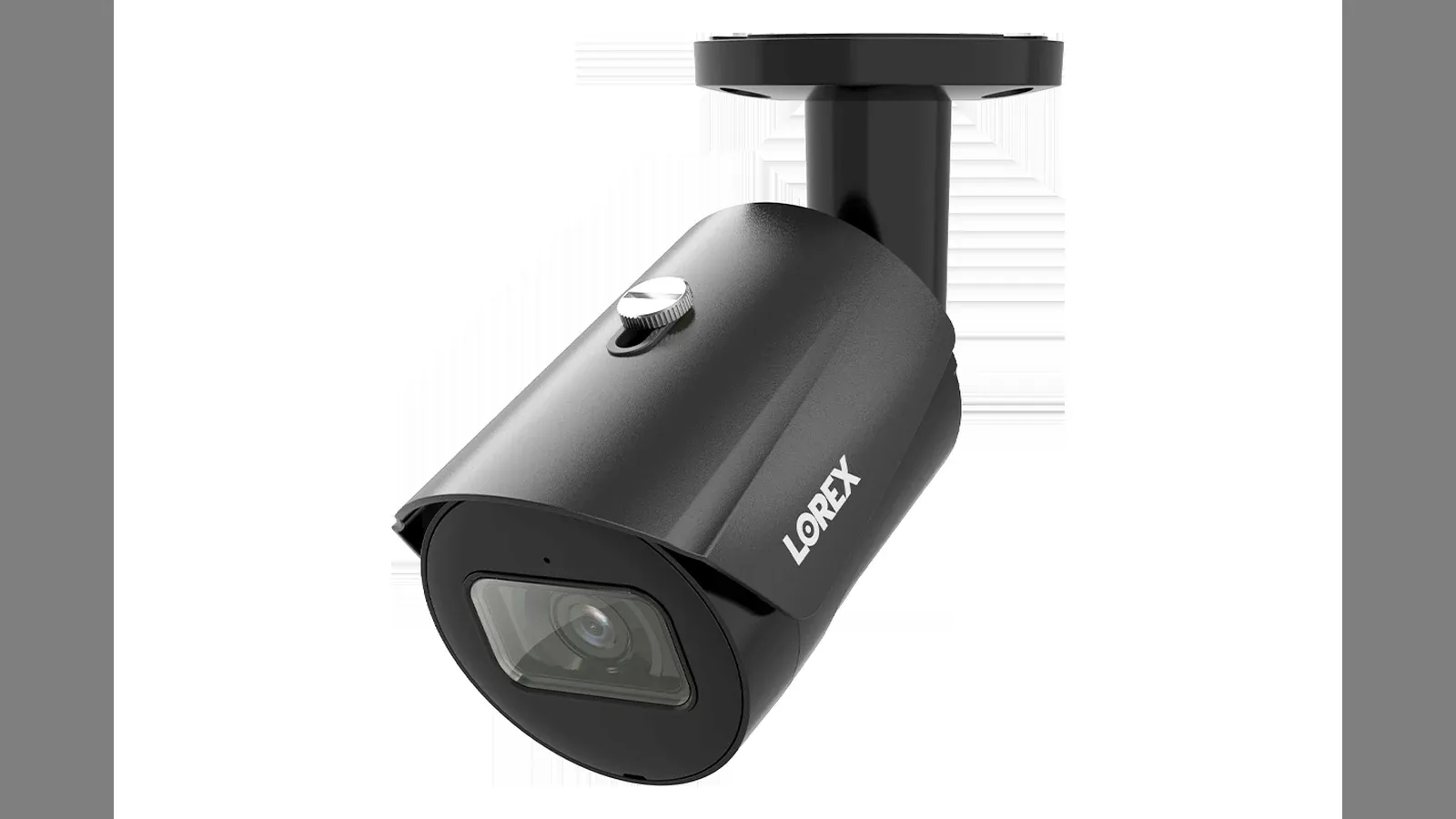
The Imou camera records continuously to a microSD card inserted in the device. That’s very convenient—until you need to retrieve a few weeks’ worth of video: the app only lets you save clips one at a time, with a single tap each time, and the download route goes through the company’s servers, so the speed is throttled. And if you try to remove the memory card, the camera often gets stuck in an awkward position.
This article provides instructions on how to use Imou LAN Exporter—a command-line tool that directly accesses cameras on a local network, downloads recordings in bulk, and combines them into a single .mp4 . No need to open an app, remove the memory card, or go through the Internet.
Why is LAN routing different?
Imou cameras (and Dahua, since Imou is Dahua’s consumer division) have a proprietary protocol running on port 8086, similar to RTSP. The manufacturer’s app uses this connection when the phone and camera are on the same network. This connection streams footage faster than real time, and there’s no intermediary to limit the speed.
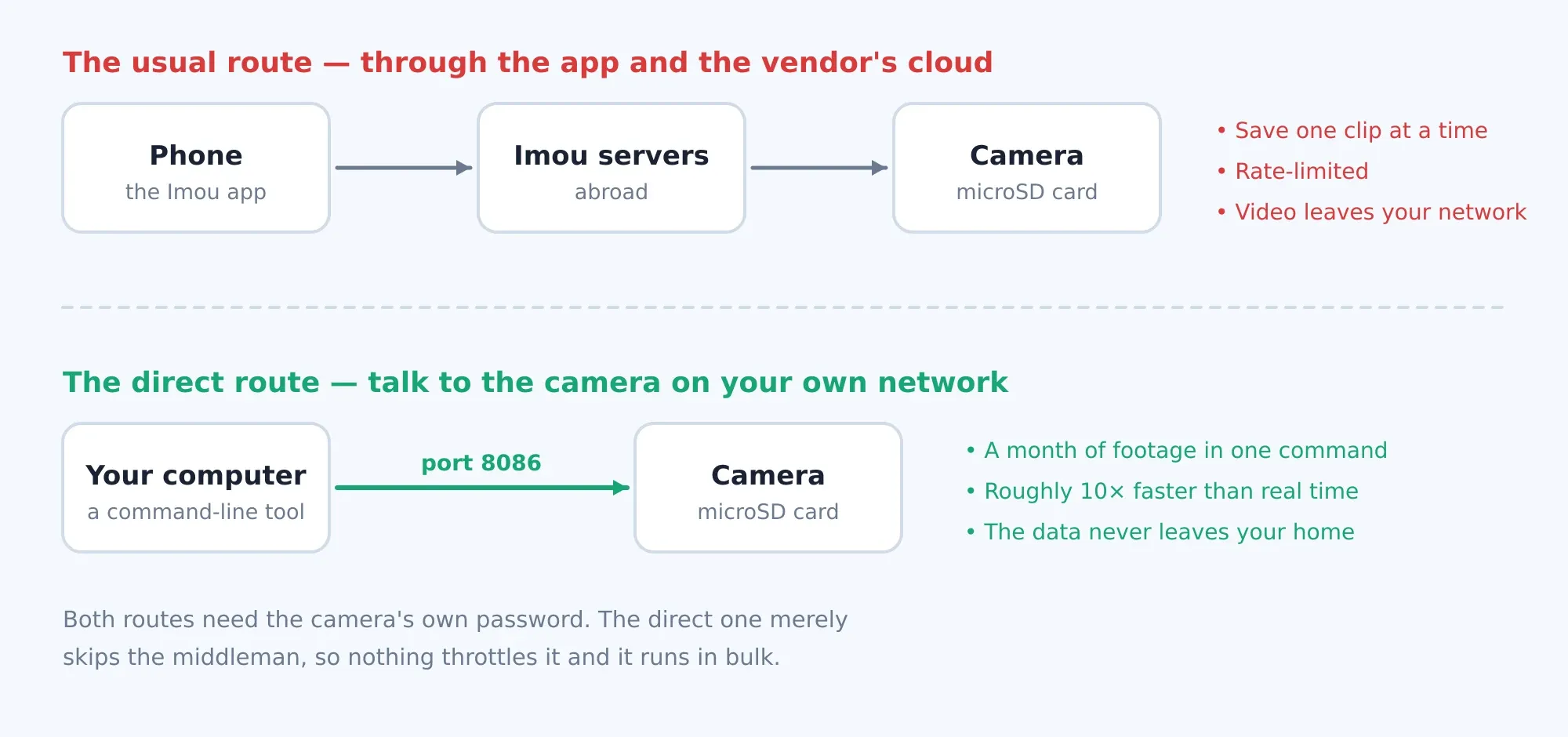
The trade-off: the video and audio in that stream are encrypted with a key derived from the device’s serial number. The tool correctly reconstructs that key, so it requires you to enter the serial number—the only piece of information that cannot be read over the network.
Preparation
- Python 3.8 or later
- Libraries
cryptography ffmpeglocated onPATH- A computer on the same LAN as the camera (or with a route to it, such as via a VPN)
- The serial number and password for each camera
git clone https://github.com/Crust92/Imou-LAN-Exporter.git
cd Imou-LAN-Exporter
pip install cryptography

# ffmpeg, tuỳ hệ điều hành:
sudo dnf install ffmpeg          # Fedora
sudo apt install ffmpeg          # Debian / Ubuntu
brew install ffmpeg              # macOS
winget install Gyan.FFmpeg       # Windows
Where can I find the serial number?
The serial number is in the format 25144ADPSF26C76, printed on a sticker on the device body, on the box, and in the QR code used to add the device to the app. If you’ve ever downloaded a video clip using the Imou app, the serial number is included in the file name, between underscores: <thời gian>_<SÊ-RI>_….mp4.
Step 1 — Scan the network for cameras
python3 imou_lan_exporter.py scan

# hoặc chỉ định dải mạng nếu máy có nhiều card mạng:
python3 imou_lan_exporter.py scan --subnet 192.168.1.0/24
A tool that scans all ports on the 8086 and prints a list of machines that respond, along with the string realm that the camera uses to challenge authentication:
Scanning 192.168.1.0/24 ...
  192.168.1.5   realm=Login to 819D10EB5D1C0F8A
  192.168.1.6   realm=Login to 98188148059E78C6
  192.168.1.7   realm=Login to 6FE33416D8D69FF5
Note that the string in realm is not the serial number—it is a different identifier. This is why you still have to enter the serial number manually.
Step 2 — First-time setup: Answer a few questions
The first time you run it, the installer will launch. It automatically scans the network, determines what's needed, and then saves that information ~/.imou_lan_exporter.json for future runs.
python3 imou_lan_exporter.py run 2026-06-01 2026-08-24============================================================
Imou LAN Exporter — setup wizard
============================================================
Scanning 192.168.1.0/24 for cameras on port 8086 ...
Found 3 camera(s):
192.168.1.5 (realm: Login to 819D10EB5D1C0F8A)
192.168.1.6 (realm: Login to 98188148059E78C6)
192.168.1.7 (realm: Login to 6FE33416D8D69FF5)
--- Credentials ---
These CANNOT be read over the network, so you must provide them.
Username [admin]:
Do all cameras share the same password? [Y/n]: y
Password: ********
--- Camera serials ---
Camera 192.168.1.5:
serial: 25144ADPSF7C4B7
verifying key ... OK ✓Notable verifying key to note: a tool that downloads a short video clip, decodes it, and checks whether the result starts with a valid H.264 frame. This way, you can immediately tell if the serial number and password are correct, instead of spending a whole month downloading files only to discover they’re all corrupted. Three possibilities:
OK ✓— The password is correct.WRONG serial/password ✗— Data was retrieved but turned out to be garbage, meaning the serial number or password was incorrect.could not test— The camera has no recordings from the past 40 days to test, so no conclusion can be drawn yet.
Why are both the serial number and the password required?
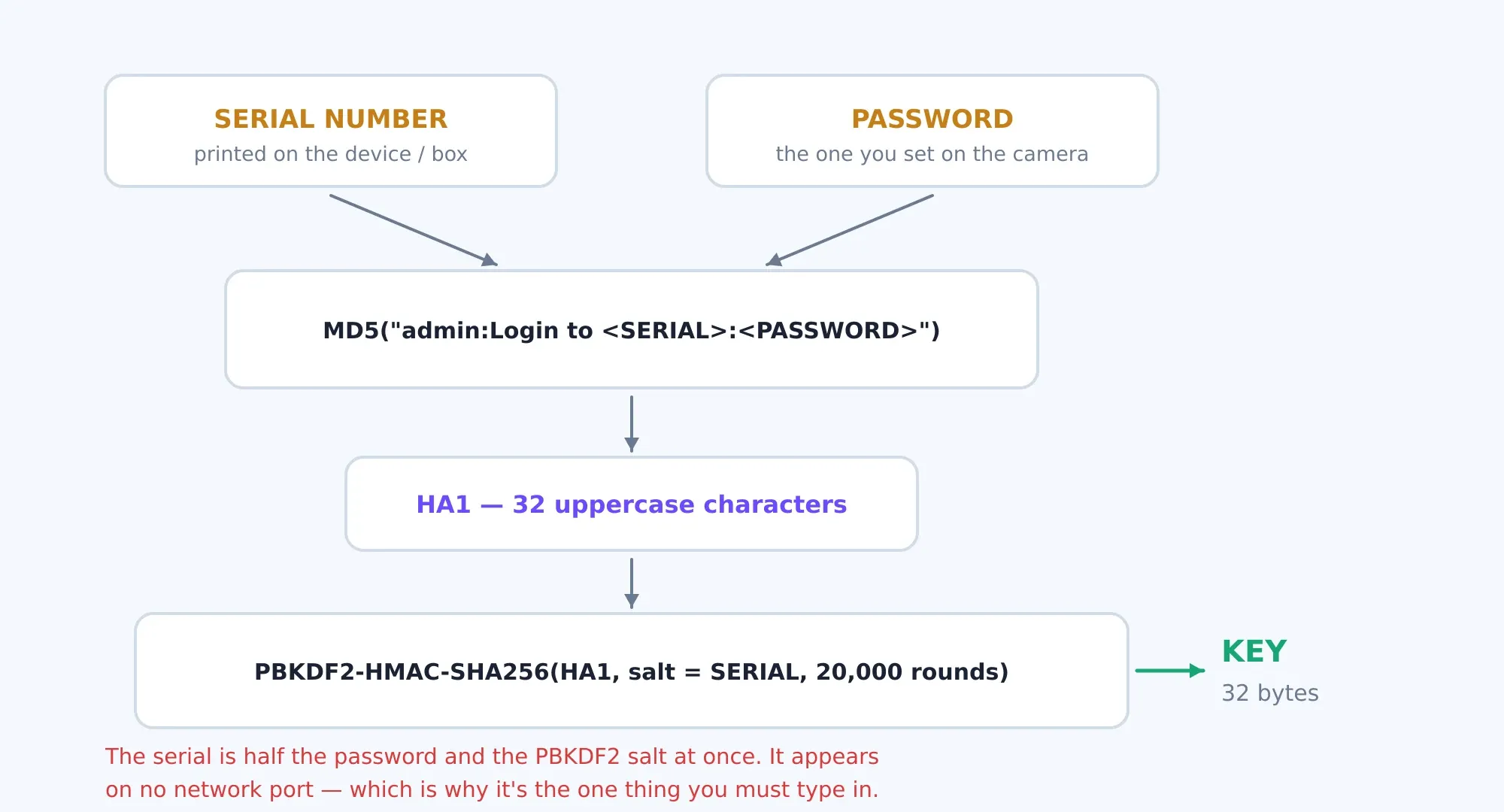
The key is generated in two stages. The first stage is the MD5 hash of the string admin:Login to <SÊ-RI>:<MẬT KHẨU>, producing a 32-character uppercase string—the standard HA1 familiar format for HTTP Digest authentication. The second stage passes that string through PBKDF2-HMAC-SHA256 using the serial number as the salt and 20,000 iterations, resulting in a 32-byte key.
Because the series is part of both the hash chain and the salt, the key cannot be derived without it. And since it does not appear on any network port, there is no way to guess it remotely. This is a reasonable design choice by the manufacturer: network scanners do not have the label in their possession.
Step 3 — Bulk Upload
Starting with the second time, just enter the approximate date:
# cả một khoảng
python3 imou_lan_exporter.py run 2026-06-01 2026-08-24

# từ ngày đó tới hôm nay
python3 imou_lan_exporter.py run 2026-08-01

# chỉ một camera
python3 imou_lan_exporter.py run 2026-08-01 --cam 192.168.1.6

# mở nhiều luồng hơn cho mạng khoẻ
python3 imou_lan_exporter.py run 2026-08-01 --parallel 12

# chạy lại trình cài đặt (đổi mật khẩu, thêm camera)
python3 imou_lan_exporter.py run 2026-08-01 --setup
While running, after each segment is downloaded, a line is printed showing the file size and average speed up to that point:
[2026-08-01 00:00] ok  41.83MB  (96.4 Mbps avg)
  [2026-08-01 00:15] ok  39.11MB  (102.7 Mbps avg)
  [2026-08-01 00:30] ok  40.02MB  (108.1 Mbps avg)
  [2026-08-02] empty (RTSP), skipped
[192.168.1.6 25144ADPSF26C76] done: ok=284 err=0
Results are sorted by camera and then by date, with each 15-minute segment saved as a separate file:
imou_out/
└── 25144ADPSF26C76/
    ├── 2026-08-01/
    │   ├── 00-00.mp4
    │   ├── 00-15.mp4
    │   ├── 00-30.mp4
    │   └── …
    └── 2026-08-02/
        └── .no-video
What if we try again?
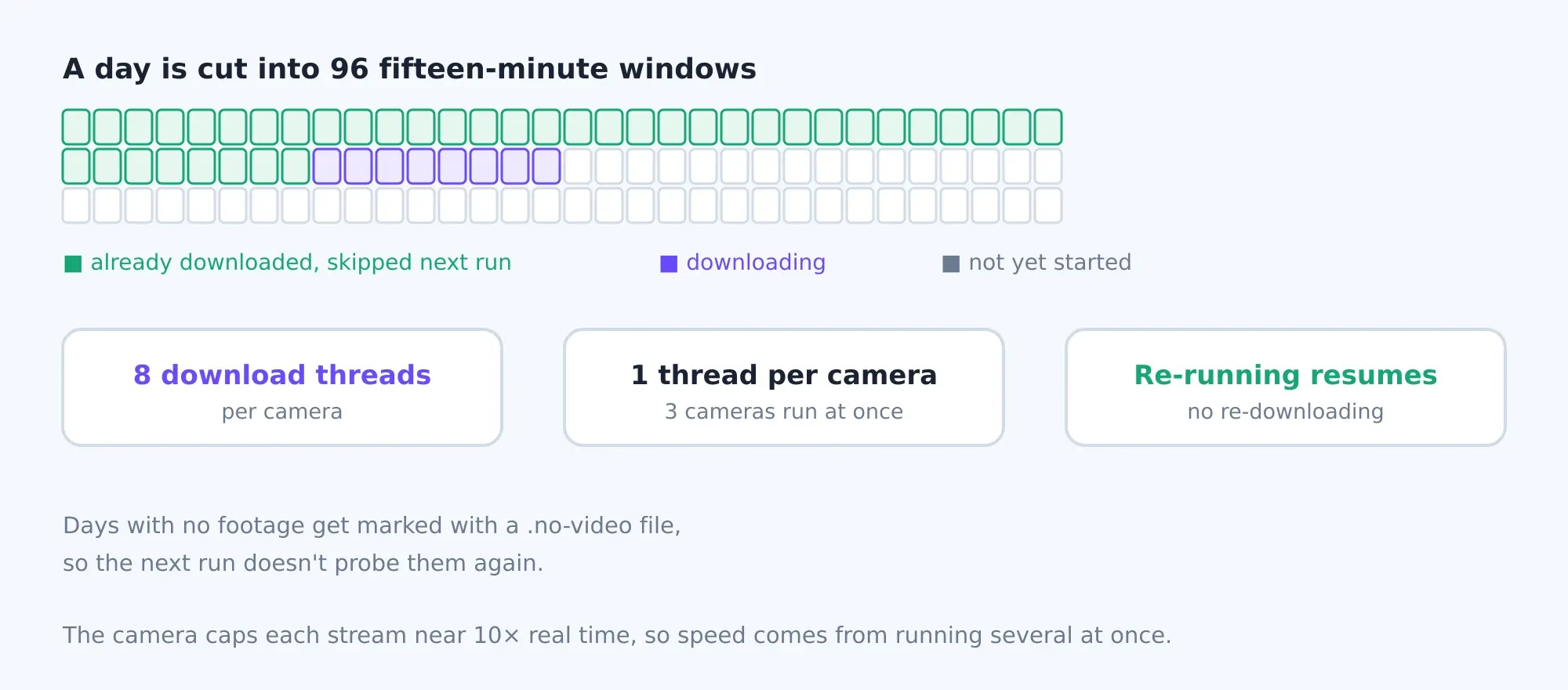
The tool is designed to run repeatedly without wasting effort. If a segment already has a file .mp4 is skipped. Days when the camera did not record anything—usually due to a power outage or before the camera was installed—are marked with an empty file named .no-video so it won’t be scanned again next time.
Before downloading an entire day’s worth of data, the tool performs a quick query via RTSP on port 554 to check if there are any recordings for that day. This query is much more efficient than attempting to download 96 segments and receiving 96 rejection responses. If your camera responds to RTSP in an unusual way and this check returns a false positive, disable it by --no-rtsp.
Regarding speed: Each camera stream is processed at about ten times real time, so the only way to go faster is to open multiple streams simultaneously. By default, there are 8 streams per camera, plus one separate stream for each camera, so three cameras actually run in parallel. On a gigabit network, the chip inside the camera is the bottleneck, not the connection. When using a VPN, the tunnel is the bottleneck.
What's going on inside it?
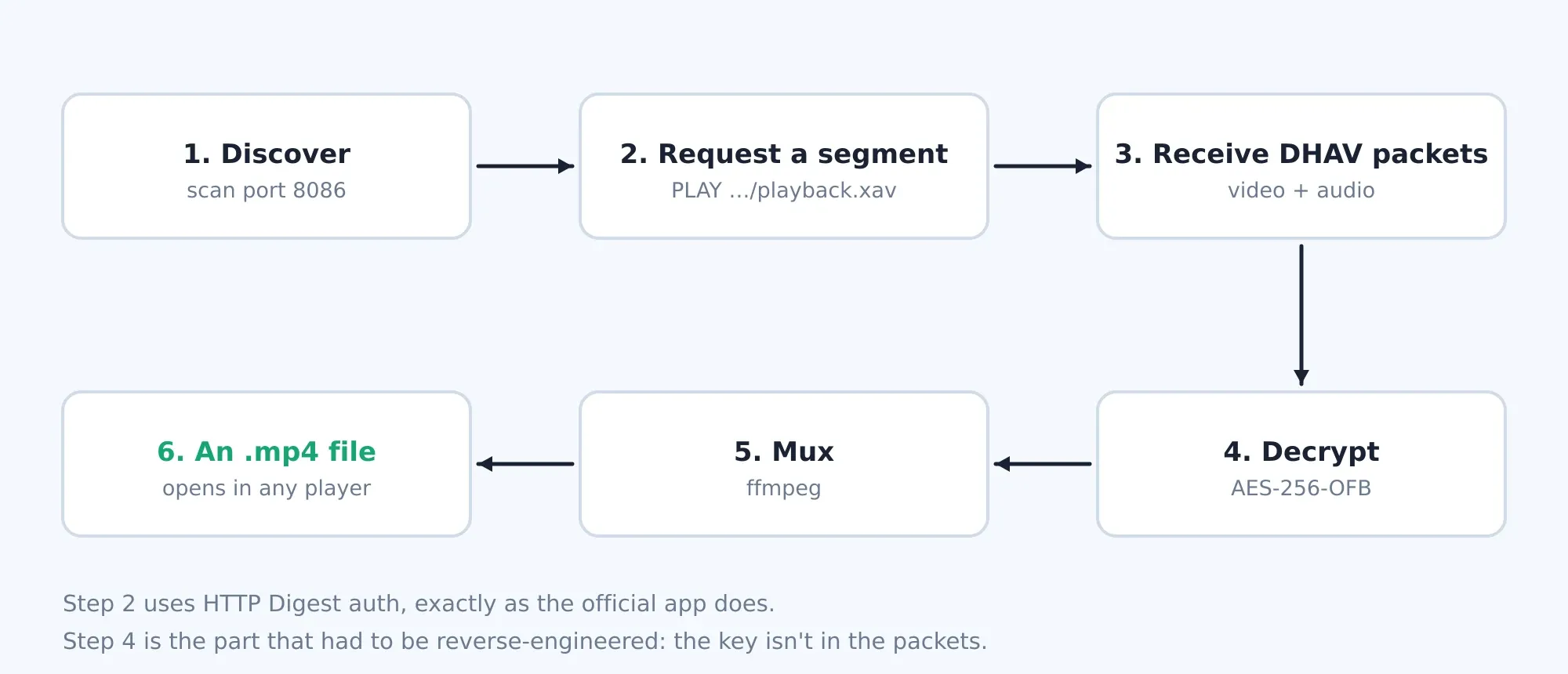
The "request video" step is a command PLAY sent to /vod/playback.xav with a start and end timestamp, authenticated via HTTP Digest. There’s a curious detail here: the software in the camera checks the Digest signature as if the verb were GET, even though the actual command sent is PLAY. Anyone who calculates the signature correctly according to the standard will be rejected; you must calculate it incorrectly—matching the camera’s error—to gain access.
The camera returns a sequence of DHAV packets—Dahua's proprietary packet format—with each packet containing a fragment of video or audio. The encoded portion is not the entire packet:
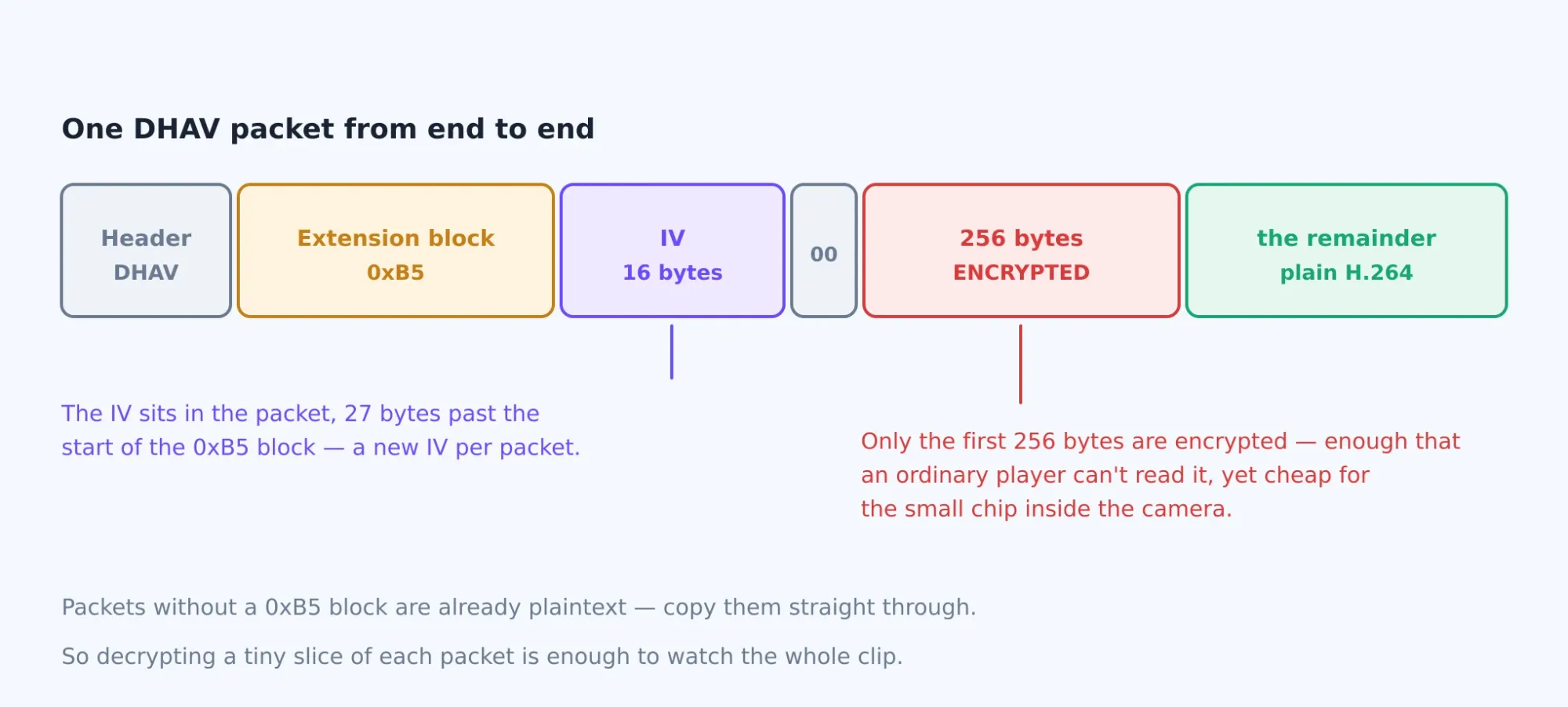
Each packet carries its own IV, hidden in the numbered extension block 0xB5, offset by 27 bytes from the start of the block. Only the first 256 bytes of the data section are encrypted using AES-256-OFB; the remaining portion is unmodified H.264. This approach is sufficient to prevent a standard player from opening the file, yet it places very little load on the camera’s chip—it only needs to encrypt a small portion rather than the entire stream.
After decoding, the tool separates the video and audio and then ffmpeg recombines them into an MP4 file, copying the original stream without re-encoding it, so the process is fast and preserves the quality.
When there is a problem
No cameras were detected during the scan
Check to see if your computer is on the same network segment as the camera—many homes have a separate guest network, or the 2.4 GHz and 5 GHz Wi-Fi networks are on different VLANs. Specify the network segment directly using --subnet. If that still doesn’t work, the installer allows you to manually enter a list of IP addresses.
Incorrect serial number or password
The password here is the device's password, not the Imou account password used to log in to the app. These two are usually different. The serial number must be entered exactly as shown, including uppercase letters.
The file downloaded, but I can't open it.
It's almost certainly the wrong key—the decrypted video is garbage. Run it again with --setup and let the key verification step run before continuing the download.
Reports that ffmpeg is missing
The tool is named ffmpeg by name, so it must be located in PATH. On Windows, after installing it using winget you need to restart the command prompt for the new environment variable to take effect.
Rough spots
The frame rate is set to a fixed 15 frames per second during merging. If a camera records at a different frame rate, the file will still play back normally, but the duration will differ from the actual duration. Audio is only merged when there is actual audio data in the clip—if the camera’s microphone is turned off, the resulting file will contain only video.
Boundary
This tool does not crack passwords or bypass any authentication layers. It does exactly what the official app does when the phone is on the same network as the camera—the only difference is that it does so in bulk and without a user interface. Its entire functionality can be summed up in one sentence: you must know the password and serial number of your own device.
Let me make this clear: if someone obtains your home camera’s serial number and password, they can also access all the recordings on the memory card in exactly this way. The serial number is printed right on the camera body. So be sure to change the default password, set a unique password for each camera, and don’t leave the camera’s 8086 port exposed to the Internet.
Source code
All the tools are contained in a single Python file, are framework-independent, and are licensed under the MIT License: github.com/Crust92/Imou-LAN-Exporter.
Thảo luận