

Updated: August 2026.
The question “Which cloud storage plan should I buy?” is almost always answered incorrectly, because it is misunderstood as “Which plan is the cheapest per TB?” In reality, the market in August 2026 is divided into three worlds that are virtually incompatible with one another: sync for end users, object storage for machines, and self-hosted solutions. Choosing the wrong segment renders price—whether cheap or expensive—meaningless—you’ll end up paying for something that doesn’t do what you need it to.
This article is a practical comparison guide: who should use what, why, and what the actual price is. An important note before you continue reading: all prices listed below are for reference only as of August 2026 and are subject to change—please check the official website before purchasing. Where exact figures aren’t available, I’ve listed price ranges and comparative ratios instead of specific numbers.
Market Map for August 2026
Group 1 — Synchronization for End Users
You’re paying for the experience: access on any device, photo and video previews, link sharing, search, and restoring previous versions. The price works out to about $4–6 per TB per month at higher tiers—which sounds expensive compared to object storage, but that plan includes the software.
- Google One — the best for photos and document collaboration. Starting in early 2026, Google will integrate AI features directly into its storage tiers, so the plan names will change (AI Plus, AI Pro) and the highest tier will get increased storage capacity. As a result, it will be difficult to separate the “storage-only” component from the AI features. There is no true end-to-end encryption (E2EE).
- iCloud+ — only makes sense if you’re in the Apple ecosystem. Plans are 50 GB / 200 GB / 2 TB / 6 TB / 12 TB, and since Apple doesn’t offer annual billing, you miss out on the 15–20% discount that nearly all competitors provide. An important point few people know: iCloud only offers true end-to-end encryption when you manually enable Advanced Data Protection; it’s turned off by default.
- Microsoft 365 / OneDrive — the Personal plan offers about 1 TB per person; the Family plan is shared among up to 6 people, with each person getting their own separate storage space. Essentially, you’re buying Office and getting storage included, so if your work relies on Word, Excel, or Teams, this is the best value for the price. Files On-Demand on Windows is currently the most polished “on-demand file” solution available.
- Dropbox — it’s pricier than average, but it remains the most stable sync solution when you dump a 500 GB folder containing hundreds of thousands of small files into it. Block-level syncing (sending only file changes) and LAN sync are areas where competitors still fall short.
- Proton Drive — default end-to-end encryption, open-source client, and governed by Swiss law. Storage capacity per tier is significantly smaller than competitors at the same price; you’re paying extra for privacy, not storage space. It makes the most sense to purchase the Unlimited plan, which bundles email and VPN.
- pCloud — major differentiator: one-time-pay lifetime plans for 500 GB / 2 TB / 10 TB. It works out cheaper than a subscription after 4–5 years, but you’re betting on the company’s longevity. It has a true native Linux client (virtual drive via FUSE) — a rarity. End-to-end encryption is an add-on feature that requires an extra fee.
- Sync.com — zero-knowledge by default, hosted in Canada, with an affordable price for 2 TB. A major drawback for many: no Linux app.
- Mega — E2EE by default, large storage tiers at good prices, and a generous free plan. On the downside, there are bandwidth limits depending on the plan, and if you lose your recovery key, no one can help you.
Group 2 — Object Storage and Low-Cost Backup Storage
There’s no fancy app here. You interact with it using the S3, rclone, restic, or Borg APIs. In return, storage is inexpensive, and you’re in full control.
- Hetzner Storage Box — by far the cheapest option in this article: the 5 TB tier costs around 11 EUR/month, or about 2 EUR per TB. It’s not S3 but rather SFTP/SMB/rsync/BorgBackup, with snapshots and no egress charges. If your goal is simply “an off-site backup,” there’s almost no reason to choose anything else.
- Backblaze B2 — about 7 USD per TB per month, with an S3-compatible API. Egress is free up to three times the amount of data you’re storing each month, and unlimited free egress when passing through partner CDNs (Cloudflare, Fastly, bunny.net…). This is the default choice for backups that include file serving.
- Wasabi — around $8/TB/month, no egress charges but with a fair-use policy: monthly downloads cannot exceed the amount currently stored. There’s a minimum of 1 TB and a minimum retention period—early deletion still incurs charges. Suitable for static content, not for short-lived data.
- Cloudflare R2 — approximately 15 USD/TB/month; twice as expensive as B2 in terms of storage costs, but with absolutely zero egress fees. Choose this only if outbound bandwidth is your biggest expense: ideal for web content, user-facing image/video repositories, and publicly shared datasets.
- AWS S3 — S3 Standard is around $23/TB/month plus egress fees charged per GB. You pay that price in exchange for an ecosystem, durability, and management features that are unmatched. For cold data, Glacier Deep Archive is unbelievably cheap (less than $1/TB/month) but comes with three pitfalls: data retrieval fees, restoration wait times measured in hours, and a minimum retention period of 180 days.
Group 3 — Self-hosted
- Synology NAS — the DSM software is still the most user-friendly option. But in 2025, Synology shot itself in the foot by restricting its newer Plus models to accept only Synology-branded drives; sales plummeted, and they lifted that restriction for SATA HDDs and SSDs starting with DSM 7.3—though the NVMe slot still only supports Synology drives. This misstep has left trust yet to fully recover.
- UGREEN NASync — the clearest beneficiary of that blunder. For a similar price, it offers more powerful hardware, including 10 GbE models, and no storage lock. The software is less mature than DSM, but if you plan to run Docker and set up your own services, that matters less.
- Immich — this Google Photos alternative is now mature enough for real-world use: it features facial recognition, semantic search, and a mobile app that automatically uploads photos to the cloud. This is the most common reason people will buy a NAS in 2025–2026.
- Nextcloud — a replacement for Google Drive that includes a calendar, contacts, and collaborative document editing. It’s feature-rich, but syncing many small files is noticeably slower than Dropbox, and you’ll need to manually keep it up to date.
Choose based on what you do
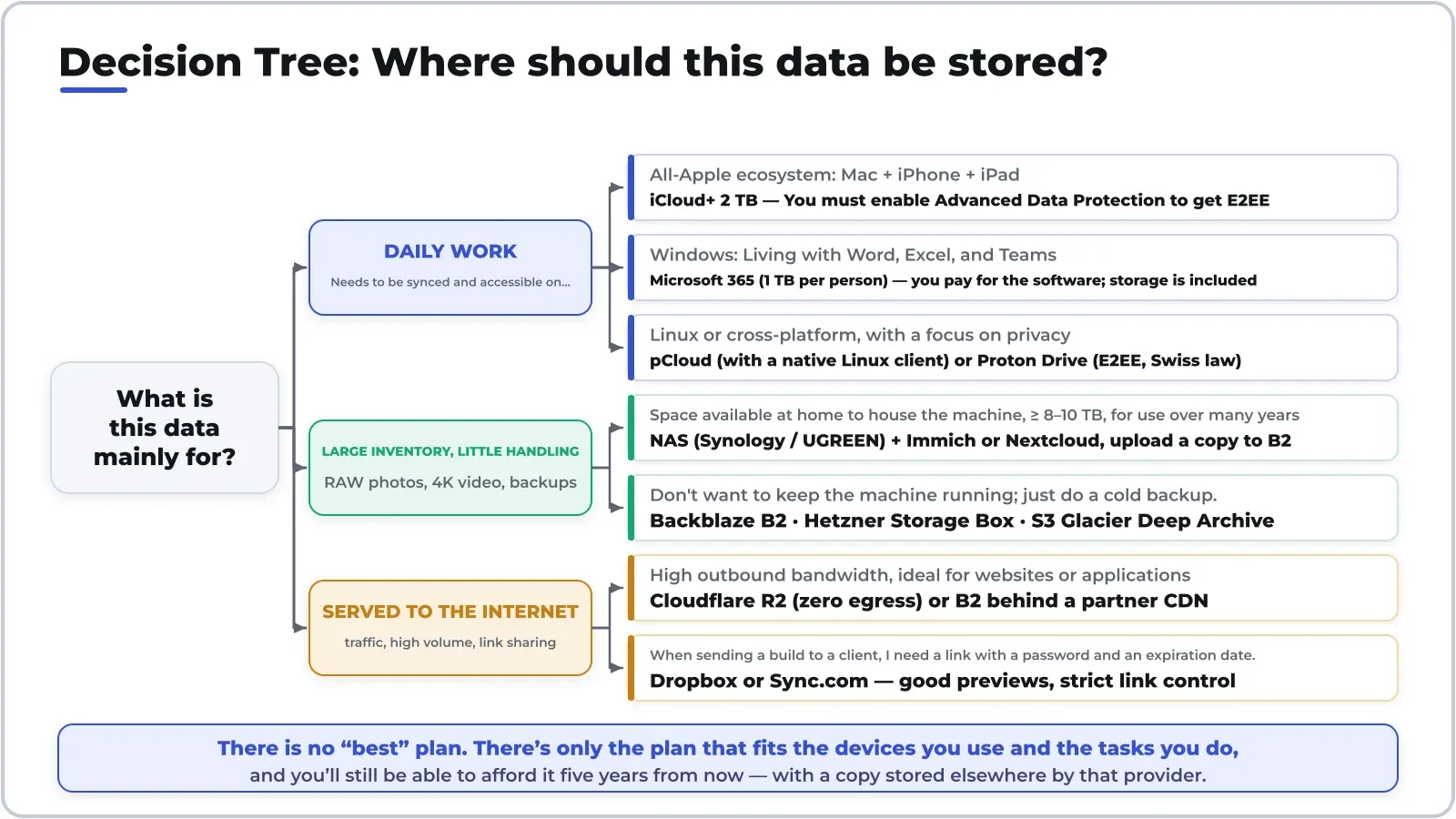
- Photography, videography. The issue isn’t storage capacity—it’s previewing: RAW and 4K video archives are useless if you have to download an entire 80 MB file just to see what the image is. Recommendation: Use a NAS running Immich as your primary storage, and back up copies to Backblaze B2 or Hetzner. If you don’t want to maintain a server, use a large consumer plan for your active folder and move older archives to object storage. Avoid Glacier Deep Archive for photos—the recovery wait time will kill any editing workflow.
- Developers. Source code belongs in Git, not in a synced folder—letting Dropbox or Drive sync a running `node_modules` folder is a recipe for corrupted files. What you need to store is what Git doesn’t keep: keys, configuration files, virtual machine images, and database backups. Recommendation: Use S3-compatible object storage (B2, R2, Hetzner) + restic or Borg, and encrypt the data on your local machine before uploading.
- Office and documents. Use Microsoft 365 if you rely on Office, or Google Workspace/One if you work in a browser. Here, the deciding factors are collaborative editing and version history, not the price per TB.
- Content creators and designers. You need to send a 20 GB file to a client and need to know if they’ve opened it. Dropbox or Sync.com: password-protected links, expiration dates, access logs, and instant previews right in the browser. This is one of the rare cases where paying extra is truly worth it.
- Just need cold storage. Hetzner Storage Box is the default choice; Glacier Deep Archive if it’s a legal archive that won’t be touched for ten years. Don’t use consumer sync services for backup—the reason is explained at the end of this article.
Select by device
- Pure Apple. iCloud+, and turn on Advanced Data Protection right away. Keep in mind that you’ll only be charged a monthly fee.
- Windows. OneDrive is virtually unrivaled because Files On-Demand integrates directly into File Explorer: files appear as if they’re already there, but only download when you open them.
- Linux. This is the harshest filter, and one that few people mention. Dropbox and pCloud have native clients; Proton and Mega have usable tools; OneDrive, iCloud, and Sync.com do not. If you work on Linux, eliminate them right from the start instead of fumbling with community-built workarounds.
- Android. Google One offers the smoothest experience; if privacy is a priority, Proton Drive or self-hosted Immich both have decent apps for automatic background photo uploads.
- Cross-platform. pCloud or Dropbox—the only two that are fully supported across all five platforms.
- Already have a NAS at home. The NAS is the primary storage; the cloud is a backup outside the home. Don’t pay twice for two primary storage solutions.
Select by group size
- On your own. A 2 TB consumer plan + an affordable storage plan for backups. Don’t buy a NAS if your data is under 4 TB—you’ll never break even.
- Family. Compare based on the number of people. Microsoft 365 Family offers 6 separate accounts, each with 1 TB. Google One and iCloud+ share a single pool—more convenient, but everyone sees the others’ storage being used up.
- Small teams of 3–10 people. This is where Dropbox and Google Workspace shine: team folders with separate permissions, deleted file recovery, and—most importantly—account handover when someone leaves. A consumer plan scaled up to multiple accounts falls short right here.
- Small businesses. The criteria change entirely: SSO, audit logs, retention policies, group-based permissions, and remote device locking. Google Workspace or Microsoft 365 Business is the default; Proton Business Suite if the industry requires high security; and an object-based cloud serves as an immutable backup layer.
The real cost: the listed price is just the tip of the iceberg
The actual invoice has four sections, but the advertisement only mentions the first one.
- Storage pricing. Prices vary by as much as 5–10 times between Hetzner (~2 EUR/TB) and S3 Standard (~23 USD/TB).
- Data egress fees. This is where the bill really skyrockets. R2 charges 0 VND; Wasabi doesn’t charge but requires reasonable usage; B2 offers up to three times the storage quota for free; S3 charges per GB. For a 5 TB repository that you have to download entirely, S3’s egress costs could exceed a year’s worth of Hetzner storage fees.
- API operation fees. Anyone who backs up millions of small files learns this lesson the hard way: PUT/GET/LIST costs can sometimes exceed storage fees. The solution is to bundle them into large blocks—which is exactly what Restic and Borg do automatically.
- Exit costs. It’s not just about bandwidth: it’s also the time it takes to transfer 10 TB over your home network, plus all the integrations, shared links, and workflows tied to your old provider. The good news is that starting in 2024, major providers have eliminated egress fees when you migrate all your data, and EU data regulations are gradually phasing out migration fees. But free migration won’t save you the time and effort required to rebuild everything from scratch.
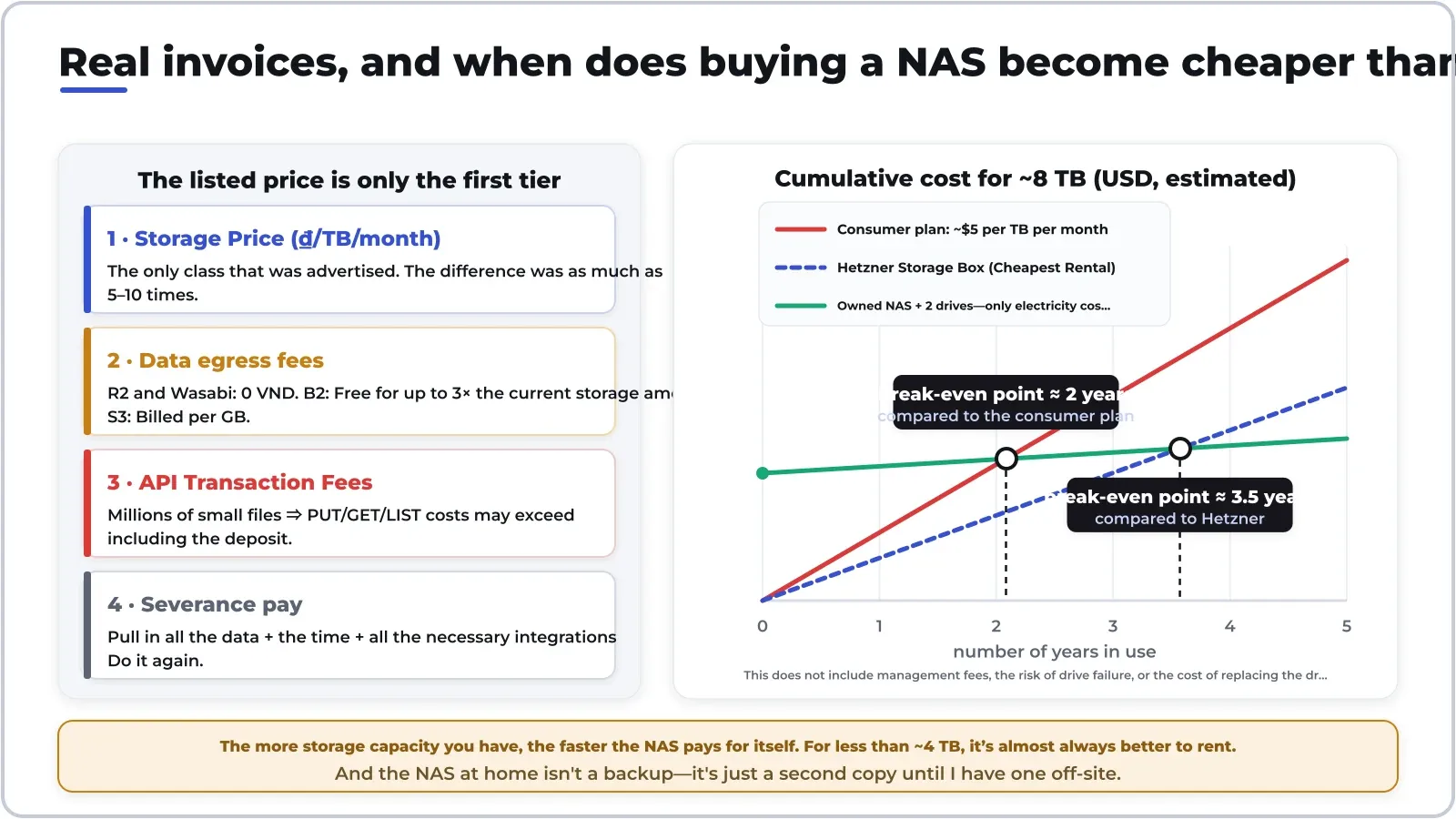
Regarding the break-even point between renting and buying: a two-bay NAS with two high-capacity drives costs about $800–$1,000 for roughly 8–12 TB of usable storage, plus a few dozen dollars in electricity costs per year. Compared to a consumer-grade plan for the same amount of data, you’ll break even after about two years. But compared to the cheapest rental option, the break-even point extends to three to four years—and that doesn’t even account for management costs, the risk of drive failure, or the cost of replacing drives in the fifth or sixth year. A rough rule of thumb: for under 4 TB, you should almost always rent; for over 10 TB and long-term use, a NAS is the clear winner; in between, it comes down to whether you enjoy tinkering with hardware.
Eight things to check before paying
- True end-to-end encryption or just encryption at rest? Almost every service advertises “encryption,” but most of it is encryption at rest—the provider holds the key and can read the data. True E2EE means they can’t read it, and it comes at a cost: if you lose the key, you lose your data, and server-side searches don’t work.
- Is there a native Linux client? Many well-known services lack one.
- Selective sync and on-demand file access. Without it, a 4 TB repository simply wouldn’t fit on a 512 GB laptop.
- Shared links can be password-protected, have expiration dates, and allow download blocking. Whether these features are available depends on the service provider.
- Version history and a trash bin. Ask specifically: how many days are retained? Thirty days is the standard; ransomware encrypts data and lies dormant for longer than that.
- Speed and bandwidth limits. Many “unlimited” plans include hidden bandwidth throttling in the terms and conditions.
- Data sovereignty. Switzerland and the EU differ from the U.S. in legal terms. If you store customer data, this is a compliance issue, not a matter of preference.
- The 3-2-1 rule. Three copies, two types of media, one off-site. An extension of this: one immutable or offline copy, and one that passes recovery testing without errors.
Common Mistakes
- Thinking of synchronization as a backup is the most costly mistake. Synchronization replicates every change—including accidental deletions and even files encrypted by ransomware—and copies those errors to the other copy in a matter of seconds. A backup is a snapshot that lets you go back in time; synchronization does not.
- Never test a restore. A backup that’s never been tested is just a belief, not a backup. Every quarter, randomly select a few files, restore them to a different folder, and open them to check.
- Put everything with one provider. Photos, documents, emails, and backups—all under the same account. If that account gets locked for some automated reason—rare but possible—you’ll lose everything at once.
- Buying based on price per TB while ignoring the device. Even the cheapest plan in the world is useless if there’s no app for the operating system you use every day.
- Enabling E2EE but not saving the recovery key. No backdoor means there really is no backdoor.
- Forgetting your own service level agreement. If this data is lost, how long will it take to get it back? The answer determines whether you’re allowed to choose Glacier.
Prediction
- Egress will continue to get cheaper, but storage prices will not. Legal pressure from the EU, combined with the fact that R2 and B2 have set the standard of “no download fees,” will force the rest to follow suit; however, the price per TB of storage will remain stable, as hard drive costs are under pressure from the insatiable demand for capacity from AI data centers.
- Storage will be increasingly bundled with AI. Google has integrated AI tiers into its storage tiers; many other vendors will follow suit. Those who simply want to buy storage space will gradually be pushed toward object storage and self-hosting.
- Self-hosting will continue to grow, but in a “hybrid” form. The most common model over the next 12–18 months won’t be NAS replacing the cloud, but rather NAS as the primary storage + inexpensive rented storage as off-site backup. Immich is the main driver pulling mainstream users into this trend.
- End-to-end encryption will become the default in the paid segment. Now that Proton, Mega, and Sync treat it as a given, major companies will find it difficult to maintain the “optional, must be manually enabled” approach that Apple currently uses.
- Lifetime plans will become less common. The “pay once, store forever” model conflicts with operational costs that rise over time; don’t be surprised if the terms of these plans become more restrictive.
To sum it up in a single, memorable sentence: don’t choose a provider first—choose a role first. Where is the original copy? Where is the off-site copy? And who is responsible for testing the recovery? Once you’ve answered those three questions, the specific plan becomes a mere detail—and you’ll never lose data because you mistakenly believed that synchronization is the same as a backup.
Thảo luận