

Updated: September 2026.
These two sentences are actual translations taken from my document repository:
- OnlyOffice → “Only Mohammad”
- “BỘ SINH SỐ” → “DEPARTMENT OF BIOMATICS”
Both are machine translations. But they come from two different services, and more importantly, they stem from two entirely different causes. One can be fixed by switching services. The other, however, remains the same no matter how many times you switch.
This article summarizes what I learned after translating a collection of over 230 technical articles into three languages—what went wrong, why it went wrong, and which solutions actually worked.
Two Types of Problems—and Don’t Use the Wrong Treatment
Type 1: The translator translates things it shouldn’t. The self-hosted translator I tried first ran very smoothly, but it treated proper nouns as common words. “OnlyOffice” became “Only Mohammad.” Photoshop became “Bristol.” This is a critical error in technical documents, because proper nouns are exactly what readers look up—if the name of the software is translated incorrectly, the entire sentence becomes useless.
Case 2: The system doesn’t have enough text to infer the meaning. The best commercial service I use handles proper nouns perfectly and translates prose smoothly—but when it encounters a label with just two or three words, it comes up with things like “DEPARTMENT OF BIOMATICS.” Here are a few other examples from my database:
- “SỐ HẠT GIỐNG” → “NUMBER OF SEEDS” (number of seeds — whereas the intended meaning is the value of the seeds)
- “nhận mẫu” → “select font” (it interprets “font” as a typeface)
- “tiền huấn luyện” → training costs (it interprets “money” as currency, not as a prefix)
- “token nạp vào” → “入金” in Japanese, meaning to deposit money into an account
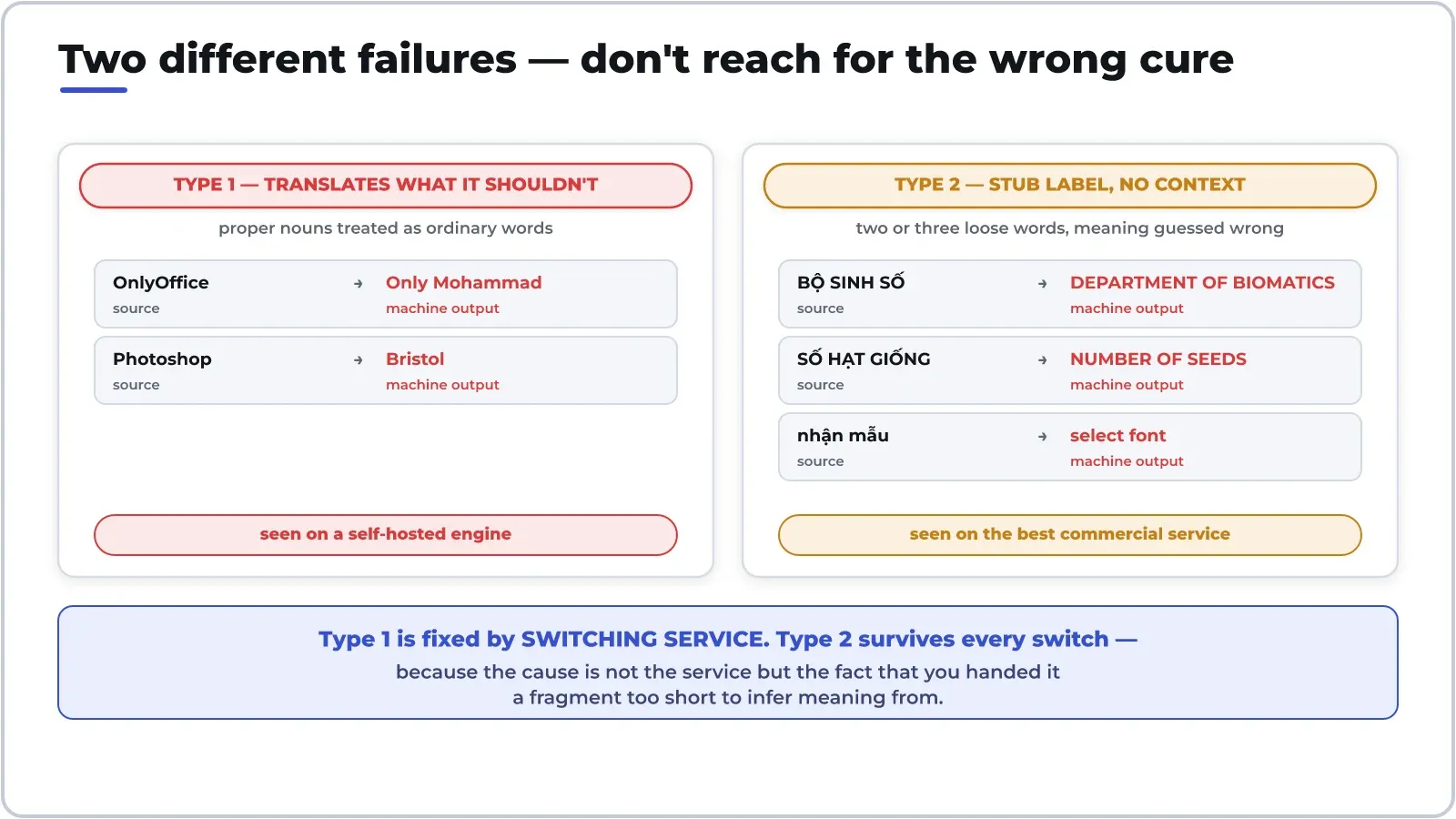
Looking at that list, you can see a pattern: the machine doesn’t make grammatical mistakes—it makes MEANING errors—and it gets them right precisely in cases where Vietnamese has homophones that can only be distinguished by context. But with labels of just two or three characters, there’s no context to speak of.
Why Do "Protective Covers" for Proper Nouns Fail?
With the first type of error, the natural reflex is to protect the proper noun before entering it into the computer. I tried two methods, and both failed—I’m writing this down so that others won’t waste their time like I did.
Method 1 — Replace proper nouns with placeholders (like XKEEP0X), then replace them back after translation. Result: the system swallowed half the sentence. The placeholder makes no sense to it, so it treats the remaining part as a truncated sentence and trims it arbitrarily.
Method 2 — Enclose proper nouns in `<code>` tags so the system treats them as code and ignores them. Result: The proper nouns are preserved, but the surrounding syntax is fragmented — the sentence sounds choppy when read aloud.
The common lesson from both instances: interfering with the input sequence is the same as interfering with what the machine uses to infer grammar. If you remove a piece of a sentence, you also remove the clue it needs to reconstruct the sentence at the other end.
The real solution is actually so simple it’s a little boring: switch services. Commercial services use their proper names right from the start—no need to sugarcoat anything. In other words—choose a tool based on which weaknesses you can’t stand, not based on which strengths sound appealing.
The sentence flows, but the label is broken
After switching to the commercial service, I measured the exact characters shown in the illustrations, and a pattern emerged very clearly:
- Complete sentences: well translated. The long sentences in the diagram and all the prose in the text resulted in readable translations that accurately preserved the terminology and required no corrections.
- Short labels consisting of two or three words: frequently incorrect. This is especially true for labels in ALL CAPS, since capitalizing them also removes any clues about part of speech.
This may sound obvious once you know it, but it turns a common practice on its head: people often extract the labels into a separate file and then feed the entire file to the translation tool, because it’s more convenient. It is precisely that convenience that compromises quality—you’ve just stripped every piece of text of its context.
If you have to translate separate labels, there are two options: include a contextual sentence, or don’t let the machine translate them at all.
Override Dictionary: The Cheapest Solution
The second method is the one I’m currently using, and it’s surprisingly inexpensive. The process can be summed up in one sentence: Before using a translation tool, look up the word in a human-compiled dictionary; if it’s there, use that; if not, then use the translation tool.
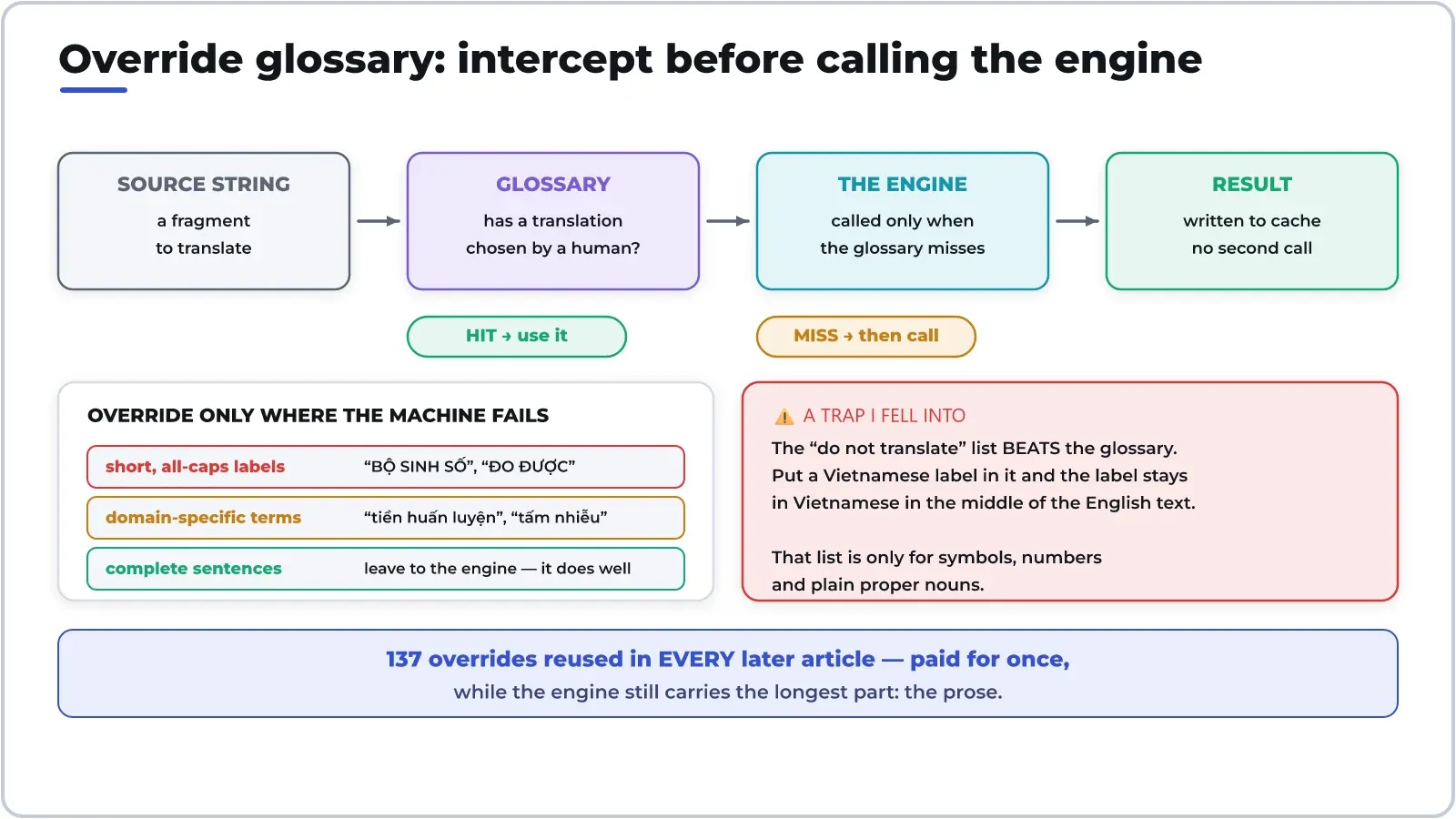
The key point is that you don’t need to translate the entire document by hand—you just need to fill in the gaps where the machine often fails. Currently, my dictionary contains 137 phrases, almost all of which are short labels and industry-specific terms. The longest sections—the prose—are still handled by the machine. And those 137 phrases can be reused in every subsequent article: the effort is made just once, but the value keeps adding up.
Most commercial services now offer this feature under the name “glossary”—but even if you create one yourself, it’s still just a lookup table and an “if-then” rule.
I fell into a trap—so I’m writing this down so no one else does: if your tool has a “do not translate” list (to preserve code, symbols, and proper nouns), make sure that list takes precedence over the dictionary. Mine does. I added a Vietnamese label to the “do not translate” list just to be safe—as a result, that label remained in Vietnamese right in the middle of the English text. The “do not translate” list should only contain symbols, numbers, and proper nouns.
The text in the IMAGE is the most valuable part
If your document contains diagrams, charts, or annotated screenshots—that part takes more effort than all the prose combined. It’s not because the translation is difficult, but because the translation expands while the framework remains the same.
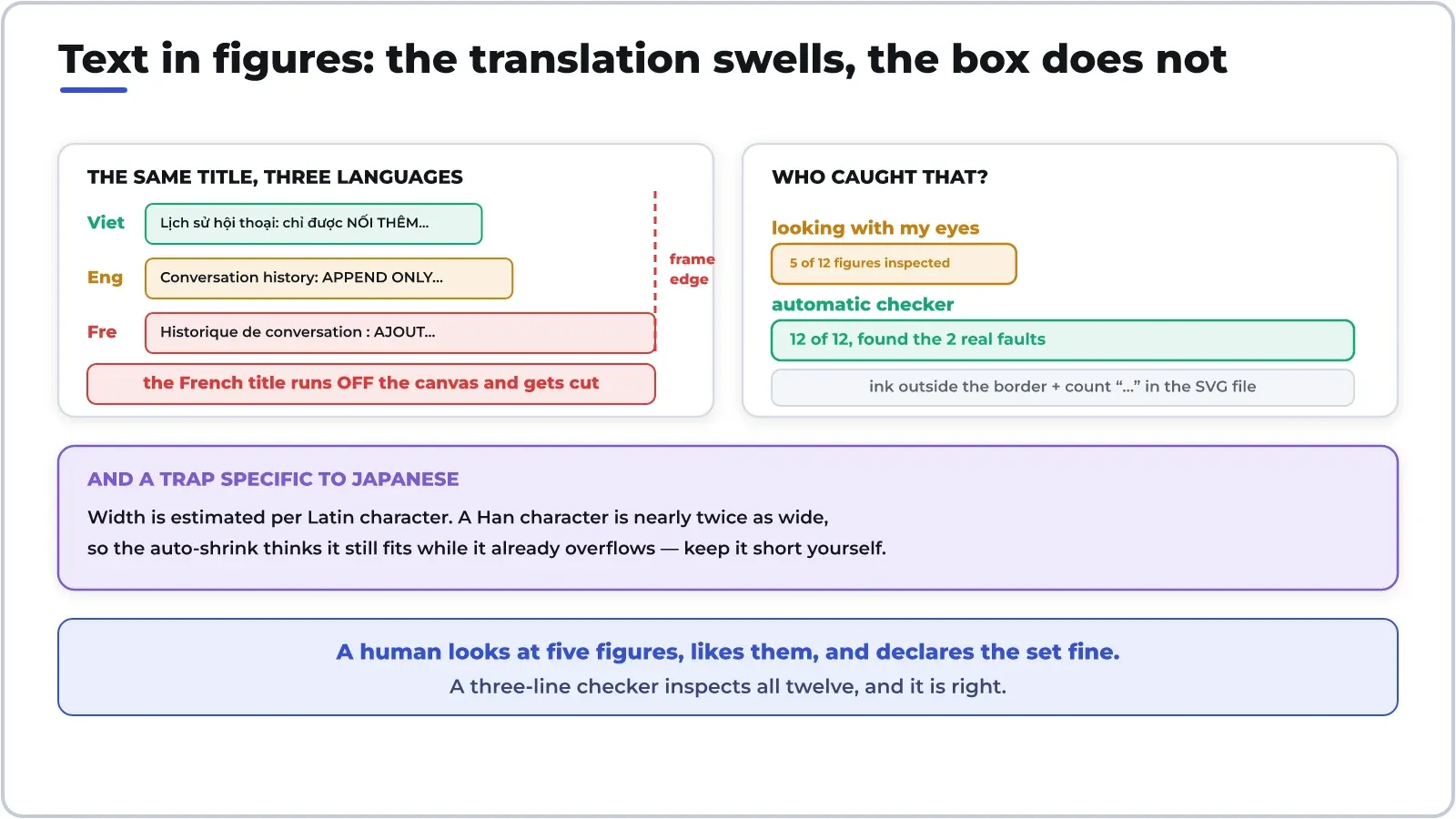
Based on the diagram I just created: for the same title, the English version is about one-tenth longer than the Vietnamese version, while the French version is as much as one-third longer. The French title extends right to the edge of the image and is cut off—whereas the Vietnamese and English versions fit perfectly.
Japanese characters present a different kind of trap. Because they have fewer characters, any function that estimates width based on the number of characters assumes the string is still short—even though a single Chinese character is nearly twice as wide as a Latin character. As a result, the auto-sizing function does not adjust the font size, and the text overflows the frame without any warning.
The solution consists of two parts. First: have all fonts automatically resize their characters when they exceed the frame—make this change in the shared function so that the entire document benefits. Second, and this is the key part: write an automatic checker.
My quality check consisted of just three steps: checking to see if any ink lines extended beyond the frame borders, and counting whether the SVG file contained any “…” characters generated by the auto-cropping function. The result: I visually inspected 5 out of 12 images, thought they looked good, and planned to post them. The checker ran through all 12 images and caught 2 flawed ones that were outside the ones I had looked at.
This is the lesson I’ve taken away from this whole experience: people look at five images, think they’re beautiful, and then conclude that the entire set is beautiful. With multilingual materials, the language you can’t read is the one you pay the least attention to.
Economics Corner: The True Cost of the Word “Free”
Three options, three ways to pay.
With a self-hosted translation tool, the translation itself costs nothing. But it consumes RAM, takes time to build, and—as measured above—comes at the cost of quality: every proper noun must be reviewed manually. With technical documents full of product names, that involves more editing work than actual translation. This is precisely the trade-off mentioned in the article about self-hosted translation services, only this time the cost is paid in proofreading time.
The free plan for commercial services typically allows for about one million characters per month. That might sound abstract, so let me put it in real terms from my own experience: a long post of about 2,600 words, translated into three languages, comes to about 40,000 characters—meaning you can publish about 25 posts a month without spending a dime. For a personal blog, that’s more than enough; for a product documentation team, it would run out in a week.
Pay-per-character packages are the most prone to calculation errors. The key figure to compare isn’t the price per million characters, but rather the total cost of translation plus the time spent on revisions. A service that appears more expensive on the invoice but preserves proper proper nouns can actually be much cheaper, since it eliminates the need for manual proofreading. This is the same pricing model based on cost per completed task rather than per request—see our comparison of cloud storage plans for examples of similar listed-price traps.
And there’s one asset that few people factor in: an overwritten dictionary is something that increases in value over time. The 137 phrases you have today will become 200 in a few months, and each phrase will be reused in every subsequent article. It’s also the only part of the entire process that isn’t dependent on which service you’re using—if you switch providers, the dictionary goes with you.
If you plan to build your own translation system, the five questions to ask before installing open-source software still apply in full—and the most important one here is the one about maintenance costs.
Prediction
- Override dictionaries will become a necessity, no longer just a premium feature. When all services translate prose equally well, the key factor distinguishing quality will be each organization’s proprietary terminology.
- Translating text within images will be automated from the start. Today, everyone translates the text first and only then realizes there are images; any tool that can combine these two tasks—and automatically resize the text to fit the frame—will capture the majority of the demand for multilingual documents.
- An automated checker will be integrated into the translation process, much like a spell-checker. Its purpose isn’t to evaluate translation quality, but to catch mechanical errors: text overflowing the frame, truncated text, or untranslated strings.
- Self-hosted translation systems still have a place, but it’s a different one. Where data cannot leave the server—such as medical records or contracts—lower quality is still an acceptable trade-off. But for public documents, the rationale for using them is fading.
- But the human review stage will not disappear. The more fluent the machine becomes, the harder errors are to spot: a grammatically correct sentence with the wrong meaning is far more dangerous than a broken one. There must still be someone who knows the language to review it—and automated tools simply help them avoid having to scrutinize the things the machine can already catch.
Thảo luận